What Safe AI Agent Deployment Actually Looks Like in Practice
If an AI agent can read, write, run tools, or touch business systems, it needs real controls. Safe deployment means clear boundaries, human approvals where risk increases, and logs that explain what the agent actually did.

Tobias Holmgren
Practical AI agents, automation workflows, and reviewed business systems.
Published May 22, 2026
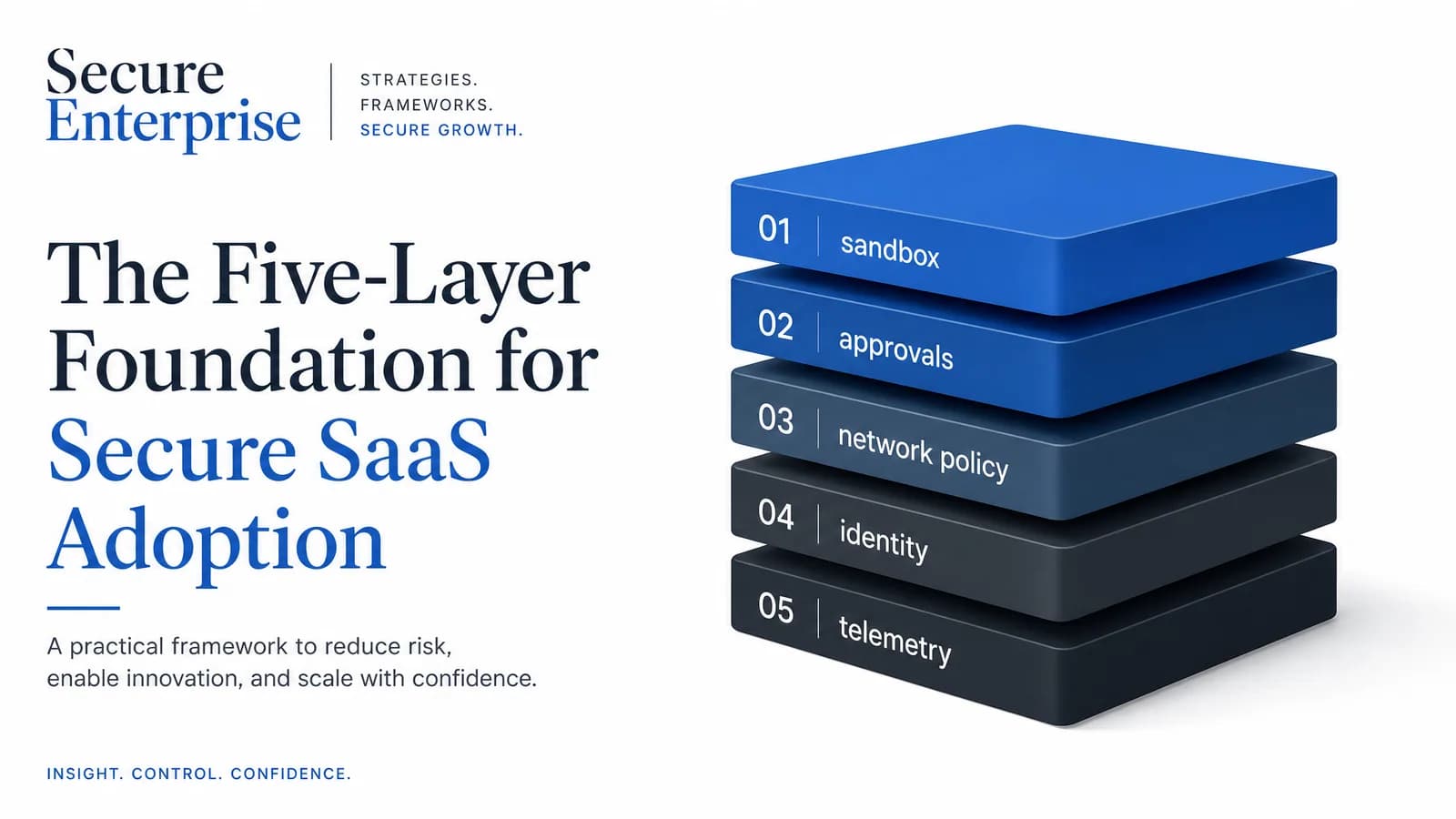
A lot of teams talk about AI safety in abstract terms. But once an AI agent can read files, run commands, move data, or touch business systems, the question changes.
It is no longer do we trust the model. It becomes what exactly is this agent allowed to do, when does a human need to step in, and how do we know what happened afterward. That is the difference between an interesting demo and a system a real business can safely deploy.
If an AI agent can act, it needs boundaries, approvals, and auditability.
Key takeaways
Safe AI agent deployment is not a trust problem alone. It is a control design problem.
The most useful control stack usually includes sandboxing, approvals, network policy, identity controls, and telemetry.
Low-risk actions should stay fast. Higher-risk actions should pause for review.
Logs need to explain not only what happened, but why the agent tried to do it.
Businesses that design these controls early will adopt agents faster with fewer surprises.
What changed
For a while, most people experienced AI as a chat tool. Now agents can do more than answer questions. They can inspect files, call tools, move through workflows, connect to systems, and complete multi-step tasks with less hand-holding.
That is useful, but it changes the risk profile. The old model was simple: a person asked for output, got a response, and copied it manually into the next step. The new model is different. The agent may act inside the workflow itself.
That means deployment is no longer just about model quality. It is also about operational controls. Recent OpenAI engineering and security writeups made that shift unusually concrete. The useful lesson is bigger than one product: safe agent systems need technical boundaries, explicit approvals, managed access, and agent-aware logs.
What safe deployment means in simple terms
In simple language, safe AI agent deployment means letting an agent be useful without giving it silent, unlimited freedom. A good setup does not assume the agent will always make the right choice.
Some actions are routine and can run quickly
Some actions carry more risk and should stop for review
Some systems or destinations should be blocked entirely
Every important action should leave a trail someone can inspect later
The five controls that matter most
1. Sandbox the working area
A sandbox is the technical boundary around where the agent can operate. In practice, that usually means the agent can work inside a defined workspace, but not write freely across the whole machine or environment. If the answer to what can this thing touch without asking is almost everything, the system is too open.
2. Use approvals when risk increases
Not every action deserves the same level of friction. Reading local files inside a defined workspace is not the same as deleting data, reaching an unfamiliar external domain, or changing production configuration. A practical approval model keeps low-risk work moving and stops the agent when the stakes rise.
3. Limit network access on purpose
If an agent can call out anywhere, mistakes and data leakage become much more serious. The safest pattern is a managed allowlist mindset: known destinations can be allowed, unusual destinations can require approval, and clearly unwanted destinations can be blocked.
4. Treat credentials and identity as part of the system
If an agent connects to tools, those connections need governance too. Who authenticated it, which workspace it acts inside, where tokens are stored, and what happens when access changes all decide whether agent activity stays inside the company’s real access model or drifts into shadow automation.
5. Keep telemetry that explains agent behavior
Traditional logs can tell you that a process ran or a file changed. Agent-aware telemetry can go further by showing the user request that started the work, the tool action the agent attempted, whether the action was approved, blocked, or auto-approved, the result of the action, and relevant network allow or deny events.
Demo-first deployment | Governed deployment |
|---|---|
Optimizes for wow-factor | Optimizes for repeatable business use |
Gives broad access early | Starts with bounded access |
Treats approvals as annoying friction | Uses approvals as a deliberate control |
Leaves network access too open | Applies allowlists, denylists, or approval gates |
Relies on standard system logs only | Preserves agent-aware telemetry and audit trails |
Why this matters for business
This is not only a security topic. It is an adoption topic. The teams that can deploy agents safely will usually move faster than the teams that either overtrust the system and create cleanup work later or lock everything down so hard that nobody can use it productively.
What can the agent do on its own?
What still needs human review?
Can we explain its behavior if something goes wrong?
Can we expand access safely over time?
A simple rollout model for most businesses
Choose one bounded workflow with clear business value.
Define the workspace, tools, and data the agent actually needs.
Separate low-risk actions from higher-risk actions.
Add approval checkpoints for the risky actions.
Limit network access and external destinations on purpose.
Log prompts, tool use, approvals, and results.
Review the logs and tighten the design before widening access.
Tradeoff: building controls early vs late
Pros
Designing controls early makes future rollout safer and easier to explain internally.
Approval rules and boundaries can be tuned before the agent touches sensitive systems.
Telemetry becomes part of the operating model instead of an afterthought.
Cons
Early control design takes upfront time and operational thought.
Teams may feel a little slower at the start while rules are defined.
Poorly designed approval flows can create unnecessary friction if they are too broad.
Practical note
Do not confuse friction with failure. A good approval step is not proof that the system is broken. It is proof that the system knows when to stop.
FAQ
Do small businesses need this level of control too?
Yes, although the setup can be lighter. The exact tooling may differ, but the principles stay the same: bounded access, risky-action review, and enough logging to understand what happened.
Will approvals slow everything down too much?
Only if they are poorly designed. The goal is not to approve every tiny action. The goal is to keep routine work smooth and reserve interruptions for actions with bigger consequences.
Is this only relevant for coding agents?
No. Coding agents make the issue easy to see, but the same pattern applies to workflow agents, browser agents, data agents, and system-connected assistants.
What is the biggest mistake to avoid?
Letting the agent touch real systems before you decide where the boundaries, approvals, and logs should live.
Final takeaway
Safe AI agents are not built by telling yourself the model is smart enough. They are built by giving the system clear boundaries, sensible approvals, managed access, and telemetry that explains behavior. That is what makes agent deployment usable in a real business. Not blind trust. A control stack.